Amazon PPC
How to Use Amazon Brand Analytics for PPC Keywords
Most Amazon sellers know Brand Analytics exists. Far fewer know what to do with it once they are inside. They treat it as a keyword research tool, pull the biggest list they can, and call it strategy. That is the wrong instinct. Brand Analytics is the ultimate PPC prioritization tool, and the goal was never to find more keywords. The goal is to find the small set of search terms your product actually has a chance to win.
If you run ads on an established, brand-registered account and you do not have a repeatable process for deciding which keywords deserve budget, this is the post that gives you one. Most sellers do not have a keyword problem. They have a prioritization problem.
Is Brand Analytics a keyword research tool or a PPC tool?
It is both, but the PPC half is where the money is. Brand Analytics is built on Amazon's own customer behavior data: what shoppers searched, which products they clicked, and what they actually bought. That makes it far more useful than a third-party keyword scraper, because it tells you where Amazon already sees a relationship between a search query and a real purchase.
Used as a research tool, it produces a list. Used as a PPC tool, it answers a sharper question: of all the terms a shopper could search, which ones can this product realistically convert on, profitably, today? It pairs naturally with the Search Query Performance and Business Reports data you already use to diagnose listings.
Why is high search volume the wrong way to pick PPC keywords?
Here is the mistake almost everyone makes. They open Brand Analytics, find a keyword with massive search volume, and think: this gets a lot of searches, so we should target it. That logic is broken. A keyword can have enormous volume and still be a terrible PPC target.
Maybe your price is not competitive. Maybe it is a poor page fit — when you search the term, your product does not belong in the lineup that ranks, even if the words seem to match perfectly. Maybe your reviews are too thin to compete with entrenched listings, or you would have to overspend just to buy visibility you cannot convert. None of that shows up in a volume number.
The real test: A keyword is not an opportunity just because it has search volume. It becomes an opportunity when the product has a realistic path to win clicks, convert those clicks, and do it near the account's target ACoS.
What is the real question Brand Analytics should answer?
Can my product realistically win clicks and convert on this search term? That is the only question that matters. To answer it, look past your own listing and study who wins the search: the top clicked ASINs, their click share, and how that compares to their conversion share. Volume tells you how big the room is; the competitive data tells you whether you can get a seat at the table.
How do you mine Brand Analytics for PPC keywords, step by step?
The process is not about pulling the biggest list. It is about producing the cleanest set of terms that deserve ad budget.
1. Start with the ASIN, not the keyword. Before you pull anything, look at the product: its price point, review count, main use case, and the problem it solves. A small new listing should not be evaluated the same way as a mature product with thousands of reviews.
2. Pull Search Query Performance. Start with the terms where your brand or ASIN already earns impressions, clicks, cart adds, and purchases. These are not random tool suggestions — they are terms Amazon already connects to real customer behavior, which makes them the best place to begin.
3. Bucket the terms. Sort the queries into branded, core category, long-tail intent, competitor, and problem/use-case terms. Each carries different intent and needs different PPC treatment, and good keyword research fundamentals like the page-fit check keep your buckets honest.
4. Look for conversion signals, not just traffic. A term with lower volume but real clicks, cart adds, and purchases beats a giant category keyword your product cannot win. Hunt for traction and a promising funnel, not the biggest number.
5. Cross-check the term in Top Search Terms. Study the competitive landscape: who the top clicked products are, how much click and conversion share they hold, and whether they beat you on price, reviews, offer, or image quality. A term that looks great in isolation can be brutal once you see who owns it.
6. Assign a verdict: defend, scale, test, or avoid. This is the actual PPC decision, and it is covered in the next section.
7. Build campaigns around intent. Do not dump everything into one campaign. Proven converters go into exact match with their own budget, strong-but-unproven terms into phrase match, broader research terms into controlled testing — and branded and competitor terms stay separated so performance is readable.
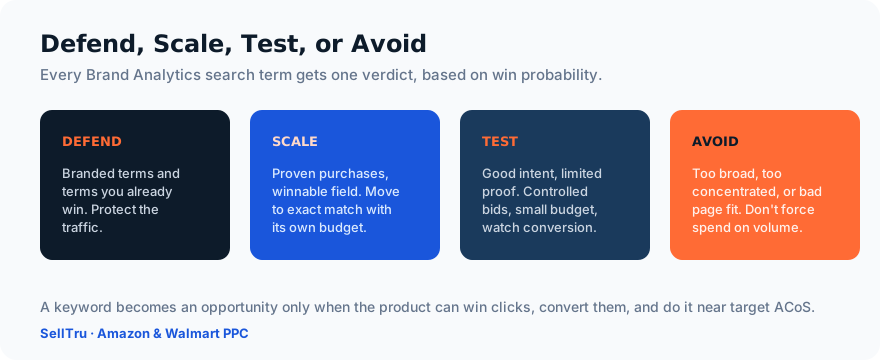
Defend, scale, test, or avoid: how do you make the call?
Defend the terms you already win, especially branded searches. Protect that traffic before chasing anything new. Scale terms where the product is already getting purchases and the field looks winnable: move them into exact match with their own bids and budget. Test terms with good intent but limited proof using controlled bids and a small budget. Avoid terms that are too broad, too concentrated, or a weak fit. Do not force spend on a keyword just because the volume is high.
Then compare Brand Analytics against your advertising Search Term Report: one shows where the opportunity may be, the other shows what your account is actually doing with it. A term Brand Analytics flags as important but your ads ignore is a gap; a term you spend on that Brand Analytics shows is dominated by stronger listings is waste. Closing that distance is one of the fastest ways to bring down a bloated ACoS.
Which Brand Analytics numbers actually matter?
Not search volume. The numbers worth your attention are click share, conversion share, purchase share, the review gap, the price gap, and whether your PPC ACoS sits anywhere near the product's break-even ACoS. A few benchmarks I use:
If a single competitor owns 40% or more of click share and holds the highest conversion share, the term is usually heavily defended — still testable, but not easy. If the top three clicked products control 60% to 70% or more of clicks, the keyword is concentrated, and competing demands a real edge in price, reviews, offer, or main image. At 75% click concentration in the top three, I get cautious: that market is expensive to break into.
The most useful diagnostic is your own click share versus purchase share. If purchase share runs higher, the product converts well when seen — a green light to buy more visibility through exact-match PPC. If click share runs higher, you have a conversion problem to fix before a traffic problem to solve. And practically: I would rather launch 10 to 20 tightly selected keywords than dump 200 into a campaign. The goal is winnable terms, not more targets.
What do most agencies get wrong about this?
Two things, repeatedly. First, they use Brand Analytics to build a keyword list instead of a priority list. If three or more sellers with thousands of reviews already own a term, it may not be a viable PPC target yet — sometimes the right move is to improve the listing and build reviews first, then come back to it.
Second, they treat every keyword the same. Branded, category, competitor, and long-tail terms should never live in one campaign structure. They carry different intent and demand different bids, budgets, and campaigns. Flattening them together guarantees you misread performance and misallocate spend. The point of all of this is better decisions made with Amazon's own customer behavior data.
Once you know which terms to chase, the next decision is which campaign types to run them in — start with our guide to the best Amazon PPC strategies for 2026.
Brand Analytics will not hand you a winning account. It will hand you the truth about which search terms your product can actually win, click by click and purchase by purchase. Read the intent, check the competition, prioritize by win probability, test with a clean structure, scale what proves itself, and cut what does not. That is the whole game.
Which keywords are actually worth your ad spend?
SellTru reviews your Brand Analytics, Search Query Performance, and PPC search term reports against your campaign structure, ACoS, margins, pricing, reviews, and competitive position — then maps out exactly which keywords to defend, test, scale, or cut. No giant keyword list. Just the terms your product can win.
Book an Amazon PPC AuditHave experience with this? The SellTru blog accepts guest posts from Amazon sellers, agency pros, and ecommerce operators. See our submission guidelines →