Amazon PPC
Amazon Negative Keywords: The Complete Guide
Negative keywords are the most underused lever in Amazon PPC. Most sellers add a handful after their first ugly search term report, feel better, and never touch the strategy again. Meanwhile it's one of the fastest ways to cut wasted spend without lowering a single bid or pausing a single campaign — you're not spending less on advertising, you're just stopping the account from paying for clicks that were never going to buy.
Amazon Gives You Two Options — That's It
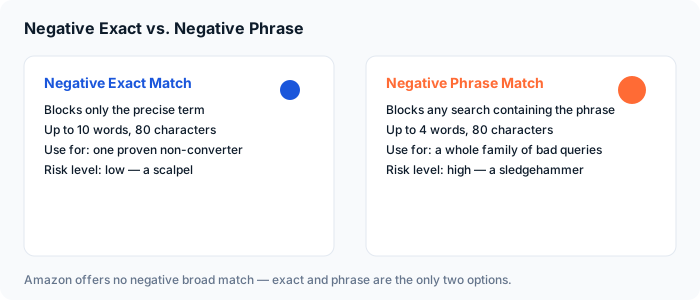
There's no negative broad match on Amazon. You get negative exact and negative phrase, and the difference between them matters more than most sellers realize. Negative exact match blocks only the precise term you enter, accounting for minor misspellings and plural forms — it can be up to 10 words and 80 characters. Negative phrase match blocks any search containing that phrase, which makes it useful for excluding a whole family of related queries at once, but Amazon caps it at 4 words and 80 characters specifically because it's powerful enough to cause real damage if you're careless with it.
The rule of thumb: negative exact is a scalpel — use it on one proven non-converter. Negative phrase is a sledgehammer — use it only when you're confident every variant of that phrase is genuinely irrelevant.
Where a Careless Phrase Negative Backfires
Say you sell men's running shoes and you add "running shoes for" as a negative phrase because a search for "running shoes for flat feet" burned through spend with no sale. That single negative phrase will also block "running shoes for men," "running shoes for wide feet," and any other variant containing that exact four-word string — including searches you'd actually want to win. This is why we default to negative exact first and reserve negative phrase for terms that are unambiguously bad in every form, like a completely unrelated product category or a competitor brand name.
Where to Find the Terms Worth Blocking
Pull your search term report and sort by spend, descending. You're looking for terms that have burned more than roughly 2 to 3x your max cost-per-acquisition with zero sales — we cover how to calculate that number for each ASIN in our Amazon PPC audit checklist. Anything above that line with no conversions is a negative exact candidate. Do this weekly while you're actively cleaning up an account, and monthly once it's stable — new junk search terms accumulate every time Amazon's algorithm tests your ad against a new query.
The 2026 Shift: Negatives as Traffic Sculpting, Not Just Cost Control
Negative keywords used to be purely defensive — block the bad, save the money. In 2026 they're doing double duty: they're also how you teach Amazon's targeting systems which buyer profiles actually match your product, and how you control which campaign gets credit for which search. This is called traffic sculpting. Once a keyword proves itself as an exact-match winner, add it as a negative exact inside your broad and automatic campaigns. That forces future traffic on that term into the exact-match campaign, where you control the bid precisely, instead of letting your automatic campaign keep paying discovery-level rates for a term you've already proven out. Amazon has also started rolling out ASIN-level negatives, letting you block your ads from showing against specific product pages — useful when your ad keeps appearing next to a competitor listing that's converting your clicks into their sales.
The Mistake That Costs Sellers the Most: Over-Negating Winners
A keyword with a high ACoS is not automatically a bad keyword. If you're managing purely to campaign-level ACoS, you'll eventually negative-out a search term that's converting at a high rate and lifting your organic rank across dozens of related keywords — the exact pattern we break down in our guide to ACoS vs. TACoS. Before you negative anything, check whether it has sales. A term with sales and a rough ACoS needs a bid conversation, not a negative keyword.
A Simple Weekly Negative Keyword Routine
Pull the search term report. Flag anything past your 2 to 3x max CPA threshold with zero sales — add as negative exact. Flag proven exact-match winners and negative them into your broad and auto campaigns to sculpt traffic. Skip anything with sales, no matter how the ACoS looks in isolation. Repeat next week. This is the entire routine, and most accounts we take over have never run it once.
Negative keywords are free — you don't pay Amazon to add them, and every one you add correctly is money that stops leaking out of the account by tomorrow morning. There's no faster win available in Amazon PPC.
Tired of Paying for the Same Bad Clicks Every Month?
We'll pull your search term report and show you exactly which terms are burning budget with zero sales — free, no obligation, done in about 15 minutes.
Get a Free AuditHave experience with this? The SellTru blog accepts guest posts from Amazon sellers, agency pros, and ecommerce operators. See our submission guidelines →