Amazon PPC
Amazon PPC Audit Checklist (2026 Guide)
Most sellers — and more agencies than I'd like to admit — open an Amazon PPC account and start changing bids before they've actually looked at what's happening inside it. That's backwards. You can't fix an account you haven't measured, and in my experience, the average account we take over is quietly leaking 20% to 30% of its ad budget on search terms, campaigns, and bids nobody has reviewed in months. An audit isn't a nice-to-have before you start optimizing. It's the only thing that makes optimizing mean anything.
Here's the exact process we run on every account before we touch a single bid. Do it yourself in about 90 focused minutes and you'll know more about your account than most agencies bother to find out.
Step 1: Give Yourself Enough Data to Trust
Amazon's own guidance is to look at automatic campaigns with a minimum of two weeks of data. Manual campaigns need longer — how much longer depends on your keywords' monthly search volume. A keyword that gets 50 searches a month needs a much wider window than one getting 50,000, or you'll "fix" things that were really just noise. I default to 30 days for manual campaigns and 60 to 90 days for slower movers.
Step 2: Map the Structure Before You Judge the Numbers
Before you look at a single metric, understand what you're looking at. List every active campaign and tag it: Sponsored Products or Sponsored Brands, automatic or manual, and match type if manual. If your campaign names don't already tell you this at a glance, that's finding #1 — a naming convention missing campaign type, product, and match type will slow down every audit you ever run on this account, including this one.
Quick structure check: If you can't tell a campaign's match type, target ASIN, and objective from its name alone, rename it now. Future-you will thank present-you.
Step 3: Hunt the Search Term Report for Dead Weight
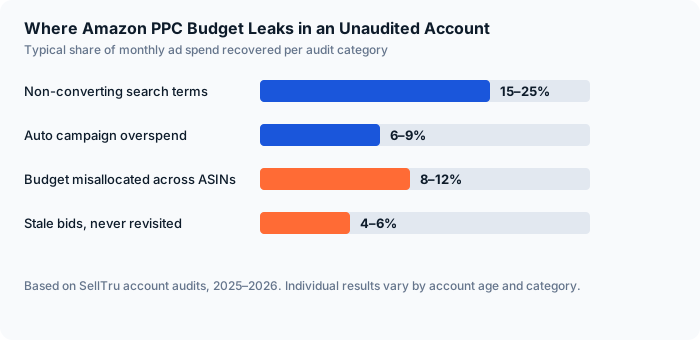
This is where most of the wasted spend actually hides. Pull your search term report, sort by spend descending, and look at every term above your break-even threshold with zero — or near-zero — sales. If you don't know your break-even ACoS and max cost-per-acquisition off the top of your head for each ASIN, stop here and calculate it; we walk through that math in our guide to managing PPC by TACoS instead of ACoS. Once you have that number, any search term that's burned more than roughly 2 to 3x your max CPA without a sale gets added as a negative exact match immediately. In a typical account we audit, this one step alone recovers 15% to 25% of monthly spend — sometimes more.
Step 4: Check Budget Against Sales Contribution, Not Habit
Pull ad spend by ASIN next to revenue by ASIN. In a healthy account, the two roughly track each other — your top revenue driver should get a proportional share of ad dollars, not whatever budget it happened to be set up with eighteen months ago. The imbalance we see most: one hero SKU absorbing 60%+ of the budget while three or four products that could be scaling sit at $10 a day because nobody revisited the split after launch.
Step 5: Score Bids Against Break-Even, Then Look Twice at the "Losers"
Now go keyword by keyword, or target by target, and compare performance to your break-even ACoS. Raise bids on anything converting well below break-even — you're leaving sales on the table. But before you kill anything running hot, ask what else it might be doing. A keyword sitting at 150% ACoS with a strong conversion rate can be lifting your organic rank across an entire search term family, which makes it more valuable than one comfortably parked at 20% ACoS and going nowhere. We've watched this exact scenario look like a loser on the campaign report and a clear winner in the P&L — full example in our ACoS vs. TACoS breakdown.
Step 6: Don't Let a Bad Listing Fake You Out
PPC has a ceiling, and that ceiling is the listing it's pointing to. If a campaign is getting clicks but converting poorly across the board — not just on one term — the problem might not be targeting at all. Check title compliance, main image quality, and whether your best search terms actually appear in the listing copy. We cover the keyword side of this in our Amazon keyword research guide. No amount of bid optimization fixes a listing that isn't built to convert.
Step 7: Make This a Habit, Not a One-Time Fix
Everything above, done once, is a cleanup. Done every one to four weeks — weekly while you're actively fixing an account, monthly once it's stable — it's an operating system. Set a recurring calendar block for it. If you want the long-form version to work from, our free 50-point Amazon audit checklist covers the same ground line by line. Accounts audited on a schedule stop accumulating the kind of waste that turns a 90-minute audit into a three-hour one the next time around.
An audit doesn't need fancy software or a six-figure retainer. It needs 90 focused minutes, the right order of operations, and the discipline to act on what you find — do that before you touch a single bid, and you'll spend the rest of the quarter optimizing an account you actually understand.
Want a Second Set of Eyes on Your Account?
We'll run this exact audit on your Amazon PPC account, free — the wasted search terms, the budget misallocation, and the bids quietly costing you money. Takes about 15 minutes.
Get a Free AuditHave experience with this? The SellTru blog accepts guest posts from Amazon sellers, agency pros, and ecommerce operators. See our submission guidelines →