Walmart
Walmart Connect Display Ads: Complete Guide
Most brands ask me about Walmart Connect Display Ads before they've gotten Sponsored Products profitable, and that's exactly backwards. Display is a real, increasingly accessible tool on Walmart in 2026 — but it's an awareness and consideration play, not a bottom-funnel converter, and running it too early usually just burns budget faster than search ads would. Here's what it actually is, how it changed this year, and when it earns a spot in your mix.
What Onsite Display Actually Is
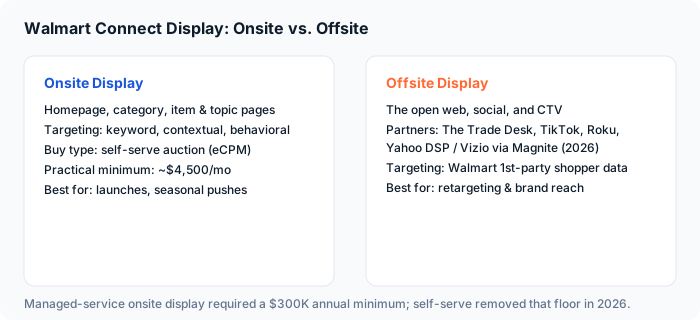
Onsite Display puts your brand or product in front of shoppers in premium spots across Walmart.com and the app: homepage banners, category and browse pages, and item and topic pages. Targeting runs on keyword, contextual, and behavioral data — including Walmart's view into online and in-store purchase history, which is something Amazon simply can't match for shoppers who buy both digitally and in a physical Walmart. It's built for rich media and video, and it's meant to support product launches and seasonal pushes, not to close a sale on the spot.
Offsite Display Is a Completely Different Animal
Offsite Display takes Walmart's first-party shopper data and follows those customers off Walmart.com entirely — across the open web, social platforms, and connected TV, through partners like The Trade Desk, TikTok, and Roku. In 2026, Walmart Connect expanded this further by adding Yahoo DSP as an offsite partner, specifically opening up Vizio CTV inventory through Magnite. That means you can now put a video ad in front of someone streaming on their television, targeted using the fact that Walmart knows what they've actually bought — a level of targeting precision most CTV buys can't touch.
Self-Serve Just Made Display Accessible to Everyone
Until recently, auction-based Onsite Display ran almost entirely through Walmart's managed service, which came with an annual spend minimum around $300,000 — a non-starter for most brands doing $1M to $20M in revenue. That changed in 2026: Walmart Connect moved auction-based Onsite Display fully to a self-serve, eCPM-based platform, and the managed-service floor no longer applies if you build campaigns yourself. There's no hard minimum on the self-serve side, but in practice you need somewhere around $4,500 a month per campaign before Display generates enough impressions to tell you anything useful. That's still real money, but it's a completely different conversation than $300K a year.
What changed in 2026: Onsite Display auction campaigns moved to self-serve, removing the managed-service minimum. Offsite CTV expanded with Yahoo DSP and Vizio inventory via Magnite.
When Display Actually Makes Sense
Run Display once your Sponsored Products and Search Brand Amplifier campaigns are already converting well and you've validated that your listing turns clicks into sales — we cover getting that foundation right in our full Walmart Connect Ads guide. From there, Display is genuinely useful for three things: launching a new product where you need awareness before search demand exists, defending category real estate during a seasonal spike when competitors are also bidding up search, and retargeting shoppers who've already viewed your item but haven't converted. It is not the tool to prop up a listing that isn't converting on search yet — Display will happily spend against a weak conversion rate with nothing to show for it, because impressions and clicks are not the same thing as sales.
How to Set It Up Without Wasting the Budget
Start narrow. Layer keyword and contextual targeting before you open up to broad behavioral audiences — the tighter start costs you some scale but tells you quickly whether the creative and offer are working before you're paying for reach that may not convert. Creative matters more here than in search: Display is a visual medium, and generic product-shot creative underperforms lifestyle imagery and video by a wide margin. And be honest with yourself about attribution — Display drives a meaningful amount of view-through influence that never shows up as a direct click-to-sale, so judge it over a longer window and alongside your overall Walmart sales trend, not a single campaign's on-platform ROAS.
Benchmarks to Expect
Treat your first 60 to 90 days on Display as a data-collection phase, similar to Walmart search campaigns — don't expect it to perform like a mature Sponsored Products campaign out of the gate. If it's still not producing measurable brand or sales lift after that window at a reasonable budget, that's a sign to pull back to search and revisit Display once your baseline search performance is stronger. For a full breakdown of how Walmart Connect compares to Amazon Ads and where each platform's ad types fit, see our Walmart Connect vs. Amazon Ads comparison. If you already run display on the other marketplace, our Amazon Sponsored Display breakdown covers the equivalent trade-offs there.
Display is no longer locked behind a six-figure managed-service minimum, which makes it a legitimate option for growing brands in 2026 — but it's still a top-of-funnel tool. Get Sponsored Products converting first, then let Display do what it's actually good at: building the awareness that makes your search campaigns work harder.
Display is usually the point where brands bring in help. We compared the field in our list of the best Walmart Connect agencies in 2026.
Ready for Display Without Wasting the Budget?
We'll map out whether Display fits your Walmart Connect account today, and what to run first if it doesn't yet — free, no obligation.
Get a Free AuditHave experience with this? The SellTru blog accepts guest posts from Amazon sellers, agency pros, and ecommerce operators. See our submission guidelines →